Codesigning for iOS Explained Simply
Thursday, May 27, 2021

There have been plenty of occasions where I have encountered cryptic error
messages in xcodebuild scripts. Sometimes, those error messages were a result
of the app not being signed.
I wasn't familiar with the concept of signing apps at the time, and I found it difficult to find simple explanations of what a lot of the terms meant for iOS development. So, this post is my attempt at explaining some core concepts simply, so that you and I can refer back to them easily in the future.
What Is Codesigning?
Signing your code does two things:
- The app your users install came from you (or another developer on your team)
- This is referred to as the "code signature"
- That your app's code has not been tampered with since you (or your team)
built it
- This is referred to as the "code seal"
If a malicious actor tampered with your app between the time you built it, and the time a user attempts to install it, then the app will not install or launch.
Codesigning protects your users from installing apps that intend to do them harm. Here's a quote about it from the WWDC17 presentation, What's New In Signing for Xcode and Xcode Server.
"Why do we code sign? Well, the simple answer is that code signing protects us. It protects us as users, it protects us as developers.
And all of us are users. All of us download apps from the store, and we're sure that, that app came from the developer that wrote it, because of code signing. And every app that we download from the store, we're sure that Apple has approved that, that app is allowed to use special system services.
We can trust the security and the privacy of our devices because of code signing."
- Chris D'Angelo: Xcode Engineer at Apple
What Do You Need To Sign Your App?
There are 3 things you will always need to sign your app:
- A signing certificate
- A provisioning profile
- Your App's Entitlements
The signing certificate establishes your identity as a developer.
The provisioning profile grants permissions for your app. It allows access to Entitlements, and allows access to run on certain devices depending on the signing certificate.
Entitlements are used to define supported capabilities, like iCloud or Wallet functionality.
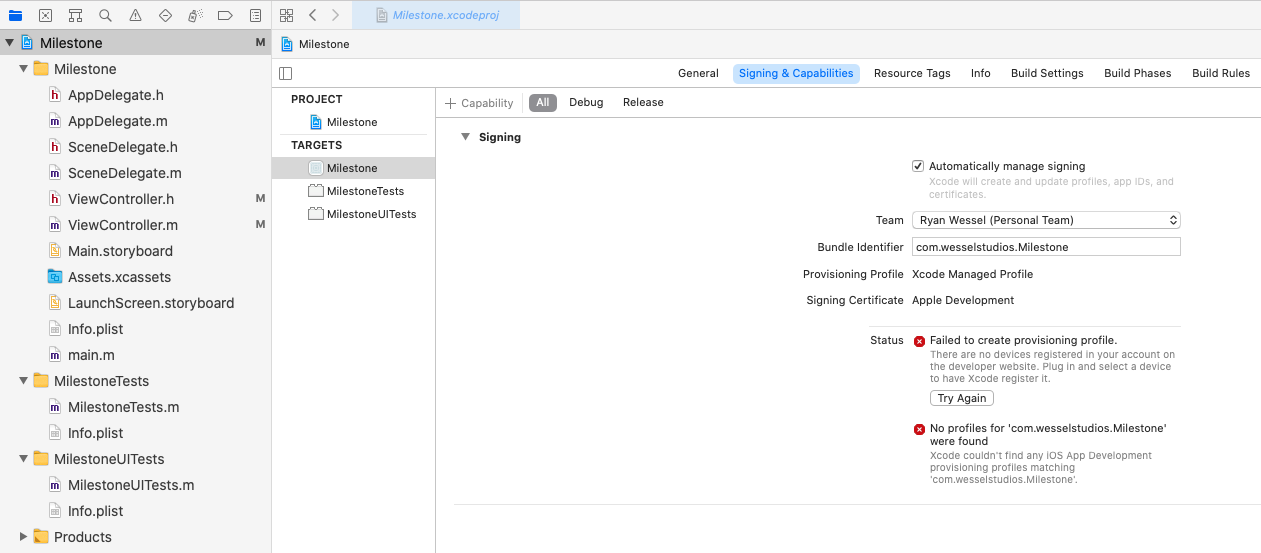
Setting up your provisioning profile and signing certificates for your app warrants a separate post, but here is a screenshot of where you are able to select your provisioning profile in the signing & Capabilities pane in Xcode@12.4.
What Types of Signing Certificates Are There?
There are a few signing certificates that are used in different contexts. It depends on how you want to distribute your app at that time.
- Development certificate
- Distribution certificate
A development certificate would be used if you are building and running on a simulator.
A distribution certificate would be used when you are deploying your app to devices. There are a few types of distribution signing types depending on your use-case.
- If you want to distribute your app to TestFlight or the App Store, you would sign your app with an Apple Developer Program distribution provisioning profile.
- If you want to distribute your app to testers with registered devices, you would use an Ad hoc provisioning profile.
- If you want to distribute your app to users within your organization, you would sign your app with a Developer Enterprise Program distribution provisioning profile.
- If you only want to distribute your app to users within your Apple Developer Program team, you would sign your app with a development provisioning profile.
To simplify, an app distributed to the App Store is provisioned to run on any device, whereas the other distribution types are provisioned to run on a specific set of devices.
What Is The Codesigning Process When Deploying?
When you're ready to share your app, you need to build an archive. An archive is a special release build of your app.
When you build it, you would use a development certificate. That way, any developer on your team can easily build an archive without requiring a special distribution certificate.
Once you've built the archive and begin the distribution process, Xcode will sign those archives with the distribution certificate.
Questions I Haven't Answered In This Post
This topic can be lengthy, and I wanted this post to be specific to explaining some terminology related to codesigning on iOS.
Here are some of the topics that I did not cover in this post:
- How Do I Set Up Certificates and Provisioning Profiles?
- What is App Store Connect?
- How Do I Manage Signing and Distribution in Xcode?
If you liked this post, and would like to learn more about some of these topics, please tweet at me. I would love to hear if this post was helpful, and would be happy to answer any questions you may have.
References
I based most of this article on these resources. If you'd like to dive deeper, these may be good places to start.